Articulated Vehicle Swept Paths: Truck and Trailer, Semi and Articulated Bus

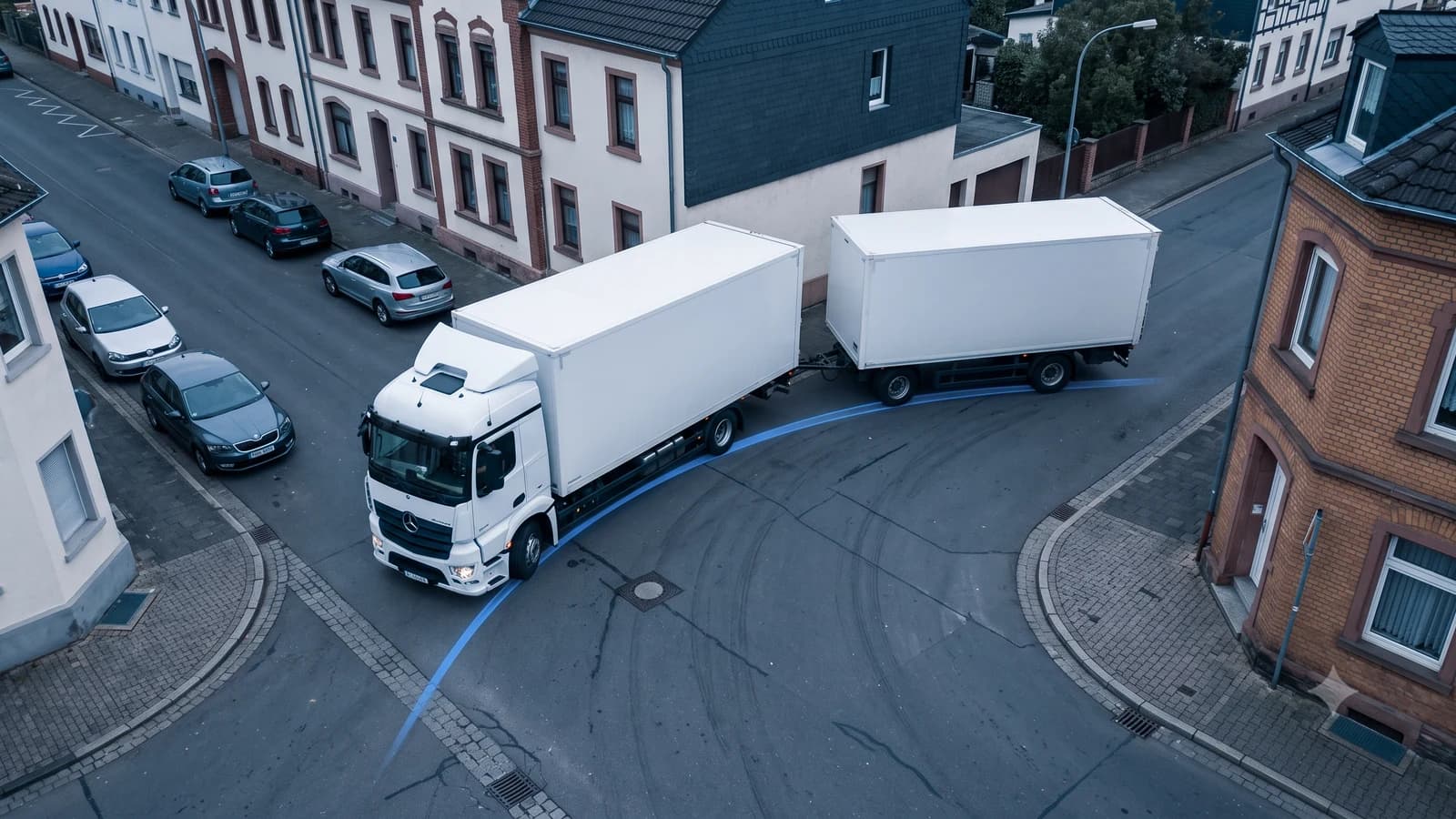
PathSweeper now supports realistic swept path analysis for articulated vehicles. Semi-trailers, drawbar trailers, central axle trailers, and articulated buses can now be simulated live while drawing a vehicle path directly in the browser.
Unlike rigid vehicles, articulated combinations do not follow a single track. Each vehicle unit reacts to the movement of the unit in front, creating additional off-tracking and larger swept areas. PathSweeper models these interactions to provide realistic results for complex vehicle combinations.
With this update, all 13 standard design vehicles from the German RBSV 2020 guidelines are available in PathSweeper, from passenger cars to 18.75 m articulated combinations.
Why articulated vehicles require different swept path calculations
A rigid truck has a relatively simple movement pattern. The rear axle follows the path created by the steering axle. Articulated vehicles behave differently because every additional unit follows its own path.
A trailer does not simply follow the exact track of the towing vehicle. Instead, it cuts inside the curve, and the critical point of the swept path often occurs at the rear of the combination rather than at the front.
This is why a turning area that works for a rigid truck may not be sufficient for a truck and trailer combination. The required swept area increases with every additional articulation point.
PathSweeper calculates the movement of each vehicle unit along the driven path and considers the interaction between all articulation points. The result is a realistic articulated vehicle swept path that reflects the actual movement of the vehicle combination.
The simulation also supports realistic steering behaviour. In Realistic mode, the steering input is limited by the maximum steering rate of the vehicle. Trailer units respond with the corresponding delay, similar to a real driving manoeuvre.
Different vehicle types, different swept paths
Although all articulated vehicles share the same basic principle, their behaviour varies significantly depending on their configuration.
Semi-trailer (16.50 m)
A semi-trailer consists of a tractor unit and a semi-trailer connected through a fifth wheel coupling. This single articulation point causes the trailer to cut significantly inside the turning path.
For tight junctions, industrial access roads, and loading areas, accurate semi-trailer swept path calculations are essential to ensure sufficient space.
Truck and trailer combination (18.75 m)
A drawbar trailer combination consists of a rigid truck pulling a trailer with a drawbar and turntable steering system.
The additional articulation point allows the trailer to follow the towing vehicle relatively well in many situations. However, the complete combination requires considerable space during tight manoeuvres.
A realistic truck and trailer swept path helps planners evaluate whether access roads, yards, and turning areas are suitable for the vehicle.
Central axle trailer (18.75 m)
A central axle trailer has a fixed drawbar and axles positioned near the centre of the trailer. Compared with a drawbar trailer, this configuration behaves differently during cornering.
The trailer can move further sideways in tight turns, creating a larger swept area that needs to be considered during planning.
Articulated bus (18.75 m)
An articulated bus consists of a front and rear section connected by a rotating joint. During tight turns, the rear section swings significantly towards the inside of the curve.
A precise articulated bus swept path is therefore essential for bus stop design, bus bays, and turning loops.
Articulation angle and vehicle limitations
Every articulated vehicle has a maximum possible articulation angle. If this angle is exceeded, the vehicle combination reaches its mechanical limit and can no longer complete the manoeuvre.
PathSweeper continuously monitors the articulation angle during simulation. If the drawn path would require a movement that the vehicle cannot physically perform, the path is automatically adjusted to remain drivable.
This ensures that every generated swept path represents a manoeuvre the vehicle can actually complete. During reversing, PathSweeper also warns users about excessive articulation and jackknifing risk.
Tested against established reference tools
Swept path calculations for articulated vehicles are particularly sensitive to modelling errors. Small inaccuracies can lead to significant differences in the final envelope.
Before release, PathSweeper's calculations were systematically compared against the established reference: all 13 RBSV 2020 design vehicles were tested against reference exports from AutoTURN Online.
The results, the method and the limits of that comparison are on the AutoTURN Online comparison page.
The underlying swept path engine is also continuously tested against analytical reference solutions to ensure consistent accuracy.
Turning circles of articulated vehicles
The turning circle of an articulated lorry or truck and trailer combination is often significantly larger than that of a rigid vehicle. This difference is especially important when planning industrial sites, loading areas, intersections, and restricted access routes.
A realistic swept path calculation provides a better understanding of the actual space required by complex vehicle combinations than simple turning radius values alone.
Availability
All RBSV 2020 design vehicles are available in PathSweeper with the permission of the Forschungsgesellschaft für Straßen- und Verkehrswesen e.V. (FGSV). They are included in the one-time Project Pass for 29 EUR per project.
The new articulated vehicle models are included as well. No subscription is required.
The standard semi-trailer is visible in the free vehicle library as a preview. Calculation access is unlocked with the Project Pass.
Additional vehicle combinations
Besides the standard vehicles, PathSweeper also supports custom vehicle creation. This allows users to create swept paths for additional combinations such as passenger cars with trailers, tractors with trailers, or specialised industrial vehicles.
This makes PathSweeper suitable for transport planning, industrial logistics, and special vehicle applications.
Create an articulated vehicle swept path in three steps
1. Upload your site plan
Open PathSweeper in your browser and upload a site plan as PDF, JPG, or PNG.
2. Calibrate the scale and select a vehicle
Define a known distance in the drawing and select the required vehicle combination, such as a semi-trailer, truck and trailer, or articulated bus.
3. Draw the vehicle path
Draw the driving path with your mouse. PathSweeper calculates the swept path of every vehicle unit in real time, monitors articulation angles automatically, and allows export as PNG, JPEG, or DXF and DWG for your CAD drawing.
For more information about swept path calculations, see our swept path analysis guide. For vehicle selection, refer to the RBSV 2020 design vehicle guide.